
Brightspace Office Hours
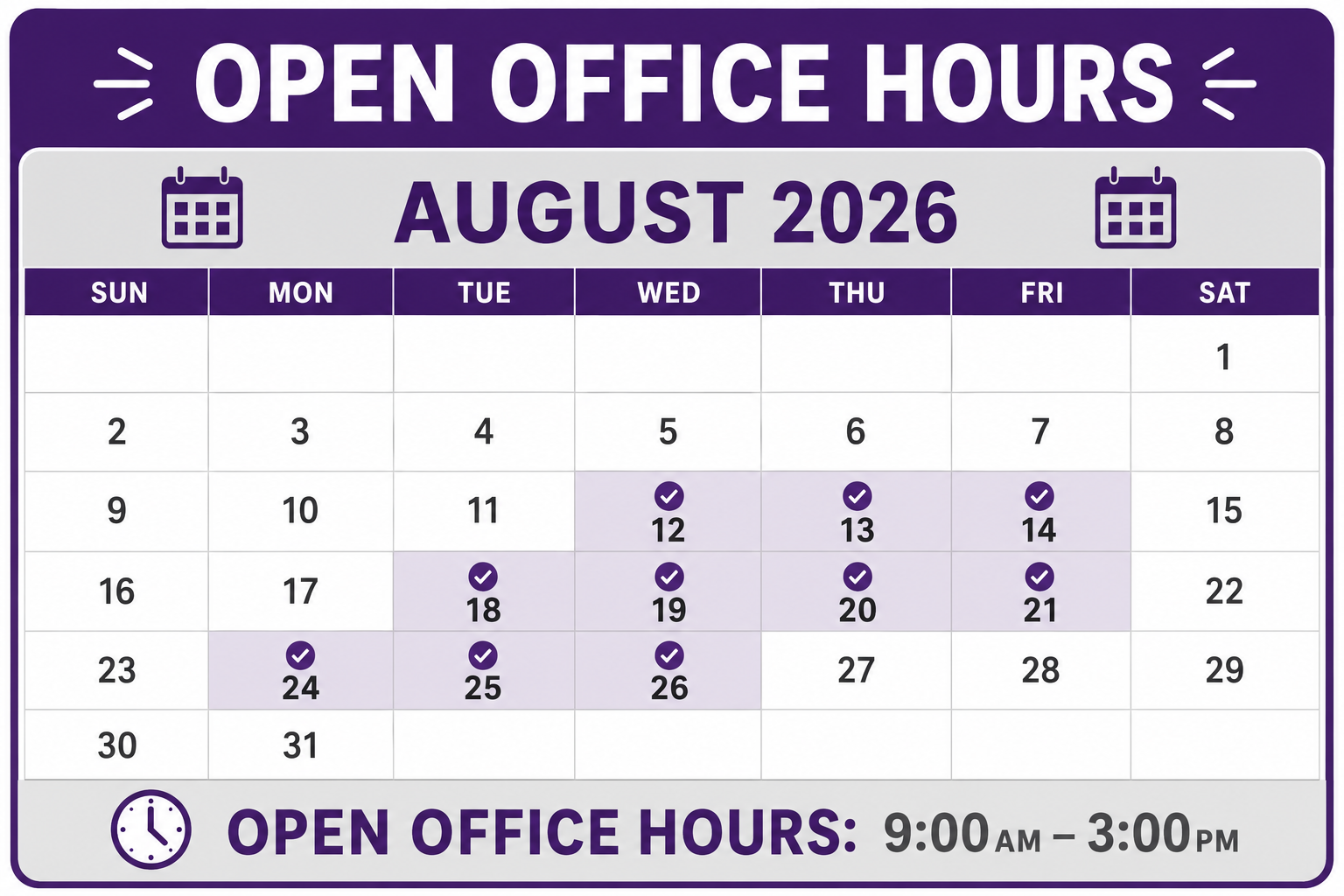 Questions about Brightspace? CETAL will be available via Zoom to provide assistance in preparation for the upcoming semester. No appointment is necessary- simply join us during any of the office hours provided.
Office Hours Dates:
August 12th – August 26th (9:00am – 3:00pm)
Note: Office hours will not be available on August 17th.
Access Brightspace Virtual Office Hours
Brightspace Fundamentals Training
Brightspace Introduction
New to Brightspace? This hands-on workshop is designed specifically for faculty who are just beginning to use the platform. You’ll gain the confidence to build and manage a course by learning the essential tools needed to teach successfully in Brightspace. Through guided demonstrations and practice activities in a sandbox course, you’ll discover how to organize course materials, create assessments, manage grades, communicate with students, and navigate the platform with ease. By the end of the session, you’ll have the foundational knowledge and practical skills needed to confidently prepare and teach a course in Brightspace. Register online.
Key topics include:
- Navigating the Brightspace interface and organizing course content with Units and Topics
- Creating and managing course materials, including pages, files, links, assignments, and quizzes
- Setting up and using the Gradebook, including grading workflows and Quick Eval
- Communicating effectively with students
- Understanding essential visibility, availability, and due date settings
Dates offered:
Monday, August 10, 10:00-12:00
Tuesday, August 18, 9:00-11:00am [COB 308]
Tuesday, August 18, 1:00-3:00pm [COB 308]
Tuesday, August 18, 5:00-7:00pm [Online]
Facilitator: Vicki Parish
Course Migration Cleanup
This workshop is designed to help you clean up and confidently move forward with your Brightspace course. You’ll walk through a practical, step-by-step process to get everything organized, aligned, and ready for students. Each session is three hours to allow for individual questions and hands-on help so you can get real work done during the session. Register online.
Key topics
- Fix your gradebook setup and categories
- Review rubrics
- Revise course activities (quizzes, assignments, discussions)
- Reorganize your course content and remove clutter
- Update announcements
- Adjust dates and visibility settings
- Do a final “view as learner” check before teaching
Date offered:
Friday, August 7, (9:00-12:00)
Facilitators: CETAL Instructional Designers
Setting Yourself and Your Students Up for Success
Brightspace is more than a place to store course materials — it’s the digital environment where your students will spend significant time learning, submitting work, and connecting with you. This training is designed with pedagogy first: every technical skill you’ll learn is grounded in why it matters for student experience and success. We’ll begin where students begin — communication and presence — because a well-designed home page and timely announcements set the tone before a single assignment is due. From there, we’ll move into building content with intention, using consistent structure and clear organization to reduce cognitive load and help students focus on learning rather than navigation. You’ll then explore developing assessments that are transparent, including how to build in accommodations from the start rather than as an afterthought. Finally, we’ll walk through managing grades in a way that keeps students informed and minimizes end-of-semester surprises. Whether you’re building a course from scratch or refining one you’ve taught before, the goal is the same: a Brightspace course that works for you and for your students. Register online.
Key topics:
- Communicate with Students – Reviewing home page widgets, structuring consistent announcements, building a My Instructor page, locating email, recognizing instant message access
- Build Content — Developing units as the base structure, building pages from scratch+templates, importing content/materials from another course, adding existing files/materials, embedding media, reordering items
- Develop Assessments – Adding test accommodations, creating assignments, building quizzes, navigating discussions
- Manage Grades – Verifying the settings using the setup wizard, building the gradebook structure, entering grades
Dates offered:
Tuesday, September 1, 1:30-3:30 (in person)
Wednesday, September 16, 1:00-3:00 (Zoom)
Tuesday, November 10, 2:30-4:30 (in person)
Monday, November 16, 11:00-1:00 (Zoom)
Facilitator: Vicki Parish
Student Engagement
Presence & Clarity
Setting the Stage for Student Success
Students thrive when they know what to expect and feel their instructor is present and engaged. This one-hour training explores how intentional course design in Brightspace can establish trust, reduce confusion, and signal to students that someone is paying attention. From your very first welcome message to the rhythm of weekly communication, you’ll learn how small, consistent touchpoints create a course environment where students feel oriented, supported, and ready to learn. Register online.
Key topics:
- Make a strong first impression — Crafting a welcome announcement that sets tone, expectations, and instructor personality from day one
- Keep students oriented — Building clear, consistently structured module pages so students always know where they are and what comes next
- Take the guesswork out of deadlines — Using the Brightspace calendar and due date tools to surface expectations and reduce “when is this due?” messages
- Build communication rhythms — Setting up recurring announcements that maintain instructor presence throughout the semester without starting from scratch each week
Dates offered: Thursday, September 3rd, 2:30-3:30 (in person) / Monday, October 19th, 2:30-3:30 (Zoom)
Facilitator: Stacy O’Brien
Interaction & Community
Designing for Meaningful Connection
Learning doesn’t happen in isolation; it deepens through dialogue, disagreement, and the experience of being genuinely heard by peers. This one-hour training shifts the focus from participation as compliance to participation as community-building. You’ll explore how thoughtful discussion design in Brightspace can spark authentic conversation, foster a sense of belonging, and give students structured ways to engage with one another’s thinking. Register online.
Key topics:
- Ask better questions — Designing discussion prompts that invite genuine reflection and diverse perspectives
- Structure peer-to-peer exchange — Setting response requirements and scaffolding peer reply prompts so students engage with each other’s ideas meaningfully
- Create space for collaboration — Using Brightspace Groups to give student teams a dedicated, organized space for shared work and ongoing conversation
- Lower the barrier to engagement — Exploring discussion formats and settings that make participation feel accessible and low-stakes, especially for quieter students
Dates offered: Thursday, September 10, 2:30-3:30 (in person) / Monday, October 26, 2:30-3:30 (Zoom)
Facilitator: Stacy O’Brien
Learning Paths with Purpose
Using Release Conditions & Intelligent Agents to Support Student Success
Great for you if: You want Brightspace to respond to what students do—providing the right next step, extra support, or a nudge when it matters.
Not every student needs the same support at the same moment. Brightspace can help you build courses that respond to student progress—revealing the next step, offering additional practice, providing enrichment, or reaching out when a student may be getting off track. In this one-hour training, you’ll explore how Release Conditions and Intelligent Agents can create intentional learning paths based on student performance, participation, and completion of course activities.
Rather than using automation simply to save time, this session focuses on the teaching decisions behind the tools. Through practical examples, you’ll explore ways to provide targeted support, encourage students to monitor their own progress, and create different pathways through course content while keeping the learning goals at the center.
Key Topics:
- Guide students toward the next step — Using Release Conditions to reveal content, practice, resources, or activities when students are ready for them
- Offer support when it matters — Providing additional explanations, review materials, or practice based on student performance or progress
- Create opportunities for choice and challenge — Building pathways for remediation, enrichment, or mastery without creating separate courses
- Reach out without constantly checking — Using Intelligent Agents to provide timely, targeted messages based on student activity or inactivity
- Keep the pedagogy in charge — Deciding when personalization supports learning—and when everyone really does need the same path
Dates Offered:
- Thursday, September 10 at 10:00 am (In-person)
- Monday, October 19 at 11:00 am (Zoom)
Facilitator: Jenny Brewer
Beyond Discussion Boards
Designing Active, Meaningful Student Engagement
Great for you if: You want students to do more than post, reply, and move on—and you’d like practical engagement ideas that work in Brightspace.
Student engagement involves more than participation points and discussion posts. Meaningful engagement occurs when students actively interact with course content, their peers, and their instructor in ways that support learning. In this one-hour training, participants will explore practical strategies for creating interaction, fostering a sense of community, and encouraging active participation using Brightspace and related instructional technologies.
Through examples and demonstrations, participants will discover how course design, communication, and purposeful learning activities can increase engagement while supporting course outcomes. The session will focus on creating opportunities for authentic interaction that move beyond traditional discussion board requirements and promote deeper learning.
Key Topics:
- Exploring what engagement looks like in online and blended courses
- Designing discussions that promote deeper thinking and meaningful interaction
- Building instructor presence through announcements and video communication
- Using groups and collaborative activities to support peer learning and community
Dates offered:
- Tuesday, September 15 at 2:30 pm (In-person)
- Thursday, October 22 at 2:30 pm (Zoom)
Facilitator: Jenny Brewer
Feedback & Momentum
Keeping Students Moving Forward
Feedback is one of the most powerful tools an educator has, but only when students can find it, understand it, and use it. This one-hour training examines how the architecture of your Brightspace gradebook and assessment design can propel them forward. You’ll learn how to give feedback that lands, build transparency into your grading process, and make choices about visibility and timing that keep students engaged and motivated throughout the course. Register online.
Key topics:
- Build rubrics that teach — Creating and attaching rubrics that clarify expectations before submission and deliver meaningful feedback after
- Make grades visible and legible — Configuring gradebook settings so students can see their progress clearly and understand how individual grades connect to the bigger picture
- Respond while it matters — Using Brightspace’s inline feedback and submission tools to return timely, targeted responses that students can act on
- Design your grading workflow intentionally — Exploring grade release options and grading schemes that align with your pedagogical values and reduce student anxiety
Dates offered: Thursday, September 17th, 2:30-3:30 (in person) / Monday, November 2, 2:30-3:30 (Zoom)
Facilitator: Stacy O’Brien
From Passive to Active
Leveraging Annoto for Greater Video Engagement
Creating a video is only half the battle- ensuring students are actually engaging and retaining the video’s content is the real challenge. This workshop aims to shift students from passive viewers to active learners using Annoto– a tool integrated in Brightspace that turns one-way video lectures into a more dynamic learning experience. Leverage the interactive features to foster social interaction, measure comprehension, and encourage self-reflection directly inside your video. Register online.
Key topics:
- Collaborative learning – Using time-stamped comments to drive collaborative conversations
- Active recall – Embedding interactive questions to check for real-time comprehension
- Metacognition – Encouraging personal digital notebooks to foster student reflection
Dates offered: Friday, September 18, 1:30-2:30 (in person) / Thursday, October 29, 2:30-3:30 (Zoom)
Facilitator: Jessica Underwood
Effective Workflows
Free Yourself to Teach
Using Brightspace Automation Tools
As educators, time is precious – yet much of it is consumed by repetitive tasks, manual tracking, and routine communication. In this one-hour training, you’ll discover how to make Brightspace work for you, freeing up time for more meaningful work. Learn how combining page templates, release conditions, and intelligent agents can automate time-consuming course logistics, allowing you to redirect your energy toward what matters most: meaningful engagement and interaction. Register online.
Key topics:
- Design with speed – Using pre-built page templates saves time and facilitates accessibility (bonus: it looks more cohesive and visually appealing!)
- Scaffold the learning progression – Setting up triggers will ensure students stay on schedule and master concepts before moving ahead
- Automate outreach – Drafting highly personalized emails based on student performance or activity maintains a supportive presence without manual tracking
Dates offered: Wednesday, September 9, 2:00-3:00 (in-person) / Thursday, October 22, 3:00-4:00 (Zoom)
Facilitator: Jessica Underwood
How Grading Supports Learning
Making Your Gradebook a Teaching Tool
Grades are often treated as endpoints, a final verdict delivered after the learning is done. But when grading is designed with intention, it becomes an ongoing conversation between instructor and student about growth, effort, and what mastery actually looks like. This one-hour training invites you to reconsider your gradebook as a pedagogical space. You’ll explore how Brightspace grading tools can be configured to communicate what matters most, keep students informed and motivated along the way, and protect the productive struggle that happens during drafts and low-stakes work before the final picture comes into focus. Register online.
Key topics:
- Let feedback do the heavy lifting — Using inline comments, overall feedback fields, and attached rubrics to ensure students walk away from a grade understanding not just what they earned, but why and what’s next
- Give students another shot — Configuring additional attempt settings on assignments and quizzes to signal that learning is iterative and that early performance doesn’t have to be the final word
- Show students where they stand — Setting up running gradebook totals and grade visibility options so students can monitor their own progress and stay engaged
- Protect the draft process — Using grade release, visibility settings, and schemes during peer review, multi-draft sequences, or low-stakes practice work, so the focus stays on learning rather than scores
Dates Offered: Thursday, September 24, 2:30-3:30 (in person) / Monday, November 9, 2:30-3:30 (Zoom)
Facilitator: Stacy O’Brien
Feedback Without Burnout
Providing Meaningful Feedback Students Can Actually Use
Great for you if: You’re looking for ways to make feedback more effective for students—and more manageable for you.
Students learn best when feedback is timely, specific, and actionable—but providing high-quality feedback can be challenging, especially in large, online, or multi-section courses. In this one-hour training, we’ll explore practical strategies for delivering meaningful feedback that supports learning while making efficient use of your time.
Using Brightspace tools such as rubrics, annotations, and audio/video feedback, participants will discover ways to improve communication with students, clarify expectations, and encourage reflection and improvement. The session will focus on sustainable feedback practices that enhance learning, strengthen instructor presence, and help students apply feedback to future work.
Key Topics:
- What makes feedback effective and why it matters for student learning
- Using rubrics to communicate expectations and support student success
- Providing efficient feedback through annotations and reusable comments
- Leveraging audio and video feedback to strengthen instructor presence
Dates Offered:
- Thursday, September 24, 10:00-11:00 (In-person)
- Thursday, October 29, 10:00-11:00 (Zoom)
Facilitator: Jenny Brewer
